I’ve just released an update to the UnitTestEx component which as the following additions:
- Re-factored API signatures to make them much simpler
- ExecuteUnitTestScript to support in/out params
- Renamed ExecuteUnitTestValidationScriptReader to ExecuteUnitTestScriptReader which also now supports in params
- Added unit test for all database related features ie ExecuteUnitTestScript
- Added database scripts to allow testing of the new unit tests.
- Compare now supports the ability to treat empty collections as the same as null collections. This feature can be useful if de-serialize your expected results from an XML file and your actual forces some collections to be null but the default behaviour of the code is to have initialized collections.
For anyone who has been using an older version, this version represents a number of breaking changes. The changes however are not significant and the APIs are now quite stable.
If you haven’t checked out the component yet, take a look at the original post and the code on CodePlex.

Currently rated 3.1 by 24 people
- Currently 3.083333/5 Stars.
- 1
- 2
- 3
- 4
- 5
In an effort to start getting more of the code I’ve been working on out in the public domain, I’ve finally released all the code for the dnp.Framework on CodePlex. While its not all complete, most of the code is quite stable and can be used now!
Some of the major components that are included in the framework include:
- Database Explorer API: An object oriented database schema API which is ideal for anyone wanting to do code generation. Its based on the provider pattern, so while it currently only supports SQL Server 2005+ its fairly easy to create a new provider for any system. This is stable enough for production use and has an extensive set of unit tests.
- Data Provider: This is a database agnostic API which is fairly similar to the one in the enterprise library except it doesn’t support datasets and the like. Its also has little overhead. This was designed before the Enterprise Library had a decent model, and it has also been used on mobile devices with the compact framework.
- DomainModeller: An abstract domain model view of a database schema (extends Database Explorer API). This API is most useful to creating scripts for code generation, where you can concentrate on domain concepts such as base classes, derived classes, namespaces and relationships etc, rather than database concepts. Using this API for code generation can significantly reduce the amount of code typically required.
- ServiceModel: This project is still under development, but aims to provide the first ‘Model’ that extends the Domain Modeller to define a Service based Application framework. The ServiceModel acts as the abstract API for the final code generation scripts which are currently written using CodeSmith. The scripts currently have good support for the data access layer (repository), service layer (business logic) and entities (using design discussed here). More...

Currently rated 2.7 by 10 people
- Currently 2.7/5 Stars.
- 1
- 2
- 3
- 4
- 5
Its been some time since my last post, so I thought I’d start back with news of a small Unit Testing library I’ve been using with my current client. I developed the library to solve a number of issues I was facing while doing my unit tests. The focus of the library is to provide support for:
- Test Spy Pattern: a type of of fake that monitors calls and data passed rather than trying to mock the implementation. A discussion of the pattern can be found in the xUnit Patterns book.
- Comparing entities: the amount of code generally required to test that an entities properties match those of the expected version can be large and tedious to write.
- Data access testing: while using Fakes and the like is great, you still need to test the code that actually talks to the database. This usually ends up taking a reasonable amount of code to setup and execute, making the test harder to read.
This library provides solutions to the above problems which in my experience has produced cleaner tests that are easier to read and understand. The library comes with a fairly detailed User Guide so I wont go into the details of how everything works here, however I will provide a quick overview of how the library attempts to solve these issues.More...

Currently rated 2.0 by 4 people
- Currently 2/5 Stars.
- 1
- 2
- 3
- 4
- 5
I've just released another sample for the Database Explorer API, this time using the built in features of Visual Studio 2008 (should work with VS 2005 with a download of the SDK). Visual Studio 2008 comes with a built in code generator known as T4. While the built in editing experience leaves a bit to be desired the free T4 editor by Clarius Consulting goes a long way to making it workable. If you download the editor, it indicates that the time bomb expires in Jan 1, 2008; this however isn't the case as they're still working on the next release.
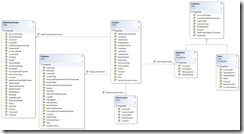
This sample creates a fairly decent (not perfect by any means) set of entities which you can then easily drop on to a class designer and get a good feel for how your domain model looks. It has support for all but the recursive relationship type, which could be added as the API does support this. This sample is provided to show how much you can do with both T4 and the API in only a small amout of code. I've included a screen shot from the Adventure Works sample, which as you can see supports many relationship types. The sample download includes the results run against the AdventureWorks sample database.
To download the new sample visit the projects CodePlex page.
Remember to provide as much feed back on the samples and API as you can. Enjoy!

Currently rated 2.9 by 15 people
- Currently 2.933334/5 Stars.
- 1
- 2
- 3
- 4
- 5
I'm in the process of getting up to speed with DSL tools, and while there's a whole lot of info out there, at the end of a long day I'd prefer to watch a video on a new subject rather than pour over the written docs, but trying to locate all the video's can be difficult, and even more if you want to view them in the right order. Well this is my effort to make things a little easier. Unless otherwise stated these videos's relate to Visual Studio 2008 edition of DSL tools, as I discover more DSL video's I'll add them to the list. If you know of a good one I've missed, leave a comment and I'll get it added. More...

Currently rated 2.6 by 5 people
- Currently 2.6/5 Stars.
- 1
- 2
- 3
- 4
- 5